Schedule a Free Demo
No obligation • Takes less than a minute
Service Request Interface
Service Request Interface is an open, no-login portal built into eWorkOrders CMMS that lets any employee, tenant, or facility occupant submit a maintenance request from any device — converting every submission automatically into a tracked, prioritized work order without a single phone call or email to the maintenance team.
eWorkOrders gives your entire organization a single, simple way to report maintenance issues — while your team gets every request automatically routed, prioritized, and converted into a work order with asset linkage, status tracking, and a full compliance record from day one.
No more missed requests. No more phone tag. Every maintenance issue captured, tracked, and closed automatically.
Customers Love Us!















Every Service Request Feature — Visible Without Clicking
Real outputs — see what your requesters and maintenance team see every day.
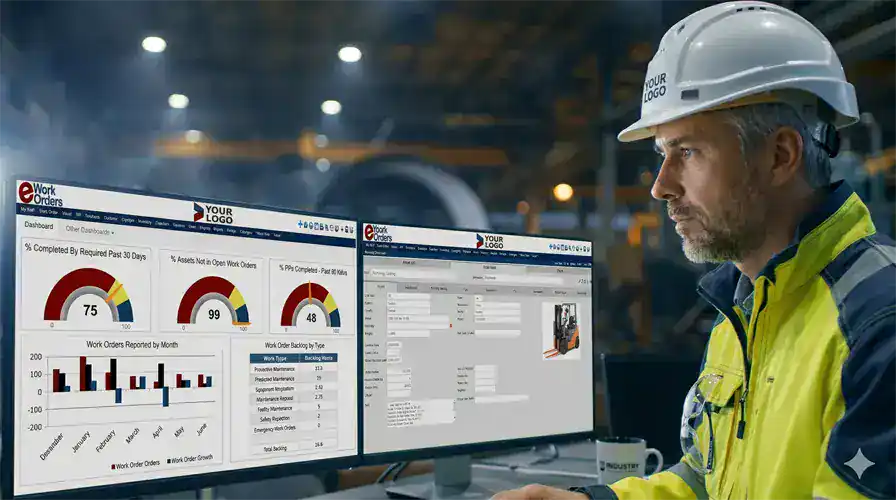
Every Request Captured. Every Status Visible. No Phone Calls Required.
The eWorkOrders Service Request Interface gives your maintenance team a live view of every incoming request — pending approval, approved and converted, rejected with notes, and closed. Filter by location, priority, asset, or requester. Nothing gets lost. Nothing falls through the cracks because someone forgot to forward an email.
Every approved request converts to a full work order automatically — pre-linked to the correct asset, with priority set and technician assigned. The requester gets a status update without anyone having to make a single phone call.
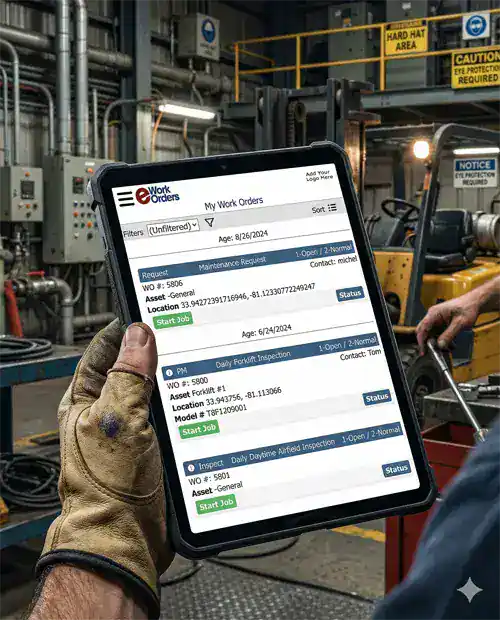
Anyone in Your Organization Can Report a Problem in Under 60 Seconds
The eWorkOrders Service Request Interface requires zero training and zero accounts. Employees, tenants, production operators, or any facility occupant opens the web portal on any browser, describes the issue, selects the location, attaches a photo if needed, and submits. That's it. The request lands instantly in the maintenance manager's queue — fully formatted and ready for review.
Requests can also be submitted by scanning a QR code posted directly at the asset or equipment — no portal address to remember, no app to install. Works on any smartphone from any manufacturer.
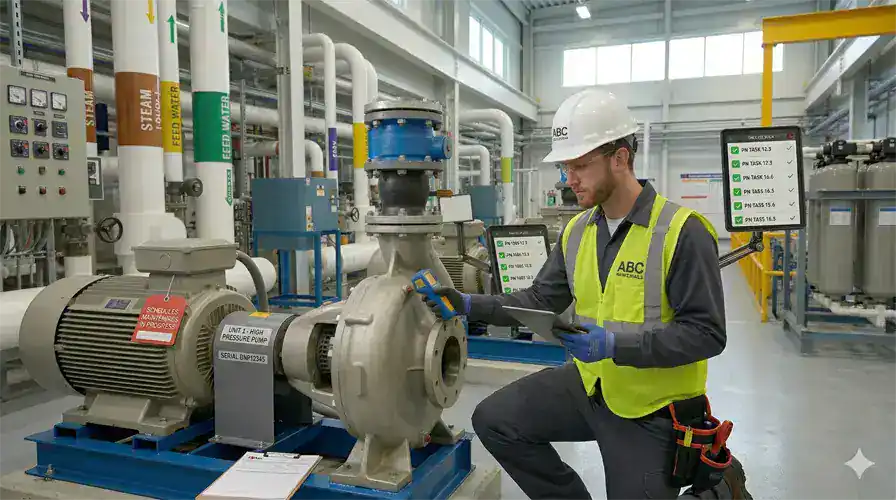
From Submitted Request to Assigned Work Order — in Under Two Minutes
When a manager approves a service request in eWorkOrders, the system automatically converts it into a full work order — asset linked, priority set, checklist attached, and technician notified via a text message or email notification. No duplicate data entry. No re-typing the description into a different form. The request becomes the work order record.
According to JLL Technologies' 2024 State of Facilities Management Technology report, 44% of FM teams say work order status tracking is their single most time-consuming daily task. eWorkOrders eliminates the manual coordination entirely — from the moment a request lands to the moment a technician closes the job.

Every Request Ever Submitted on an Asset — Searchable in Seconds
In eWorkOrders, every service request is permanently linked to the asset it was submitted against. When a technician opens a work order generated from a request, they see the full request history for that asset — what was reported before, how it was resolved, how many times this issue has come up, and whether a pattern is developing that warrants a preventive maintenance adjustment.
This turns every service request into operational intelligence — not just a one-time notification. Assets that generate recurring requests automatically flag for preventive maintenance review, helping teams shift from reactive to proactive maintenance strategies over time.
What Is a Service Request Interface?
A service request interface is an open, no-login portal that allows anyone in a facility — operators, office staff, tenants, production workers — to report a maintenance issue without needing access to the CMMS itself. The request is captured digitally, reviewed by a maintenance manager, and converted into a formal work order on approval. According to Plant Services and Advanced Technology Services, 70% of maintenance requests are still submitted by phone, email, or verbal communication — with no formal tracking, no audit trail, and no visibility into whether the issue was ever resolved.
For maintenance managers, a service request interface means no more chasing down verbal complaints, no more email chains about whether someone fixed the leak in the break room, and no more situations where a critical equipment issue was reported to the wrong person and sat unaddressed for days. Every request goes into one system. Every request is either approved and tracked, or declined with a documented reason.
The difference between a service request and a work order: A service request is a report of a problem submitted by anyone in the organization. A work order is the formal maintenance job created from that request after a manager reviews and approves it. eWorkOrders handles both — and the conversion between them — automatically.
See How eWorkOrders Handles Service Requests — Live Demo, No Commitment
Our US-based team builds every demo around your facility type, request volume, and workflow requirements.
How Anyone Can Submit a Service Request — Every Submission Method Supported
eWorkOrders handles every submission method with the same automatic conversion, asset linkage, and status tracking — regardless of how the request was submitted.
| Submission method | How it works | Login required? | How eWorkOrders handles it |
|---|---|---|---|
| Web PortalBrowser — any device | Requester opens a URL, fills out the form, submits | No login | Request arrives in the maintenance queue instantly. Manager reviews, approves, and it converts to a work order automatically with asset linkage and priority pre-set. |
| QR Code ScanSmartphone camera | Requester scans QR code posted at the asset or location | No login | QR code pre-populates asset ID and location automatically. Requester describes the issue and submits in under 60 seconds. Ideal for production floor and multi-location facilities. |
| Mobile AppiOS & Android | Requester submits from the eWorkOrders mobile interface | Optional login | Full photo capture, location selection, and priority flagging from mobile. Technicians and authorized staff can submit directly from the field with complete asset context. |
| Email SubmissionAny email client | Requester emails the maintenance team using a designated address | No login | Email submissions are captured in the request queue alongside web and QR submissions — giving maintenance managers one consolidated inbox regardless of how the issue was reported. |
| Internal Staff PortalCMMS users | Maintenance staff submit requests directly inside the CMMS | CMMS login | Staff with CMMS access can create requests with full asset data pre-populated from the asset registry — faster and more detailed submissions for maintenance-initiated service requests. |
| API / System IntegrationAutomated trigger | External system or IoT sensor generates the request automatically | System-to-system | eWorkOrders connects to ERP, BAS, IoT, and SCADA systems via API. Alarms and threshold breaches can automatically generate service requests — before a human even notices the problem. Explore integrations → |
Unlimited requesters — included in every plan at no extra cost.
eWorkOrders includes unlimited service request submitters in all Starter, Advanced, and Enterprise plans. There is no per-requester fee, no user ID management, no password resets for non-maintenance staff. Your entire organization — operators, tenants, office staff, contractors — can report maintenance issues without any account setup.
Every Service Request Capability Your Team Needs
From the first submission through work order closure and compliance documentation, eWorkOrders handles the complete service request lifecycle with no gaps and no manual coordination.
Your organization gets a branded, shareable URL that anyone can open on any browser — no account, no password, no IT setup required. The portal is configurable to match your facility's terminology and location structure.
Print and post QR codes directly on equipment, machinery, or facility locations. When scanned, the form pre-populates with the asset ID and location — so requesters describe the problem, not navigate to find it. Works on any smartphone camera without an app.
Requesters receive automatic email or SMS notifications at every stage — request received, approved and converted, technician assigned, and job closed. No one has to call the maintenance office to find out if their issue is being addressed.
Managers review incoming requests and approve with one click. eWorkOrders automatically creates the work order, links it to the correct asset, sets the priority, and routes it to the right technician — no duplicate data entry, no manual creation.
See request volume by location, asset type, requester, and time period — automatically. Identify which areas of your facility generate the most maintenance requests and use that data to justify staffing, budget, and preventive maintenance investments.
Every service request is permanently timestamped — who submitted it, when, what they reported, who reviewed it, what decision was made, and what work order it generated. This creates a complete, searchable compliance record without any manual documentation effort.
Requesters can attach photos of the problem directly from their phone camera at the time of submission. The technician arrives at the job already knowing what the issue looks like — reducing diagnostic time and the chance of arriving unprepared.
When a service request converts to a work order, the system checks inventory for the parts likely needed based on the asset's PM template and history. Procurement alerts fire automatically if stock is insufficient before the job is dispatched.
Every plan includes unlimited service request submitters. Add your entire workforce, all your tenants, every contractor on site — there is no per-user fee for requesters, no account management, and no limit on submission volume.
Connect eWorkOrders to ERP systems, building automation, IoT sensors, and SCADA via API so that alarms and threshold breaches automatically generate service requests — before anyone has to manually report them.
eWorkOrders tracks time from request submission to work order creation, assignment, and closure — automatically. Use this data to identify bottlenecks in your approval workflow, measure response performance, and set SLA benchmarks for different request types.
AI analyzes incoming service requests and suggests priority classification, asset linkage, and the best-fit technician based on skill and current workload — reducing manager review time on high-volume queues.
The 6 Stages of the Service Request Lifecycle
Every service request in eWorkOrders follows a defined lifecycle — tracked, time-stamped, and visible to both the requester and the maintenance team in real time from submission to closed work order.
Anyone in the organization submits a request through the web portal, by scanning a QR code at the asset, via the mobile app, or by email — without a CMMS login. The form captures the issue description, location, asset (if known), urgency level, and any photos. The submission is timestamped and immediately visible in the maintenance manager's queue.
The maintenance manager reviews the incoming request — verifying the asset, confirming the priority level, and assessing whether the job requires immediate dispatch or can be scheduled. The manager can add notes, adjust priority, or request additional information from the requester before approving. If the request is not actionable, it can be declined with a documented reason automatically communicated back to the requester.
With one click, the manager approves the request. eWorkOrders automatically converts it into a full work order — asset linked, priority confirmed, checklist attached if applicable, and parts inventory checked. No duplicate data entry. No re-typing the description into a different form. The requester receives an automatic notification that their request has been approved.
The work order is assigned to the right technician based on skill, shift, and proximity. The technician receives an instant mobile push notification with the complete job — asset history, checklist, required parts, and any photos the requester submitted. The requester is notified that a technician has been assigned and given an estimated response time.
The technician performs the work at the asset — completing checklist steps, logging parts used, recording labor time, and capturing photos of the completed repair. All documentation is captured in real time from mobile. Required fields enforce complete records before the work order can close. Every action is timestamped automatically.
The work order closes with a complete timestamped record — who performed the work, what was done, parts used, and any resolution notes. The requester receives an automatic notification that their issue has been resolved. The asset's maintenance history updates immediately. The entire chain — from submission to closed work order — is stored permanently in a searchable compliance audit trail.
Why Maintenance Teams Choose eWorkOrders for Service Request Management
Built for maintenance since 1995. Independent, US-based, and beholden to customers — not investors.
Starter ($380/mo) and Advanced ($480/mo) include unlimited service request submitters — your entire organization, all tenants, every contractor, at no extra cost. No accounts to manage, no passwords to reset. See all plans →
Your service request portal is live within 24 hours of signup. Print your first QR codes in the same week. No IT project, no server setup, no months-long implementation. Our US-based onboarding team handles configuration with you.
Every service request feeds automatically into your reporting — volume by location, asset, requester, time period, and request type. No spreadsheet required. Use this data to justify staffing levels and PM investments to leadership.
Founded 1995. Beholden to customers, not investors. 120+ industry awards. 4.9 stars on Capterra, G2, and GetApp. Decisions driven by what makes the product better for maintenance teams.
Questions about portal configuration, QR code setup, or approval workflow? You call a knowledgeable person who picks up and responds within hours — not days. The primary reason customers stay for decades.
Enterprise-grade security with SSO, role-based permissions, complete audit trails, and one of the highest security ratings in the CMMS industry. Your request data, work order records, and compliance documentation are fully protected.
Common Service Request Management Challenges — and How eWorkOrders Solves Them
Without a formal service request system, maintenance teams spend more time chasing down what needs to be done than actually doing it. 70% of maintenance requests are still submitted informally — by phone, email, or verbal communication — with no tracking, no audit trail, and no guarantee the issue was ever addressed (Plant Services / ATS). eWorkOrders solves every one of these bottlenecks with a single, simple interface that works for everyone in the organization.

Requests Fall Through the Cracks
When requests come in by email, text, or hallway conversation, there's no system to ensure they were received, reviewed, or acted on. eWorkOrders captures every submission in a single queue — nothing is lost, nothing is overlooked, and every decision is documented.
82% of companies experienced unplanned downtime in the past 3 years — much of it from maintenance issues that were reported informally and never properly tracked (Aberdeen Group).
No Visibility for the Requester
When someone reports a problem informally, they often never find out if it was addressed — leading to repeat reports, frustrated staff, and a maintenance team fielding status calls all day. eWorkOrders sends automatic notifications at every stage so requesters always know where their issue stands.
44% of FM teams say work order status tracking is their single most time-consuming daily task — most of that time is spent answering "did anyone fix it yet?" calls (JLL Technologies, 2024).
Manual Work Order Creation
Without a connected system, every service request means someone has to manually re-enter the information into a work order — wasting time and introducing transcription errors. eWorkOrders converts approved requests to work orders automatically with one click and no duplicate data entry.
The average maintenance technician spends only 25–35% of their shift on actual hands-on work — the rest is lost to coordination, paperwork, and chasing status (Plant Services / ATS).
No Compliance Record on Requests
Verbal and email requests leave no audit trail. When a regulator or auditor asks for documentation of a reported issue and how it was resolved, informal systems produce nothing. eWorkOrders creates a permanent, timestamped record for every service request — from submission through closed work order.
78% of CMMS users reported improvements in equipment life — tied directly to complete, consistent maintenance records from first report to final resolution (Plant Engineering).
Service Request Interface for Every Industry
Every organization has people who need to report maintenance issues. Only the assets are different.
Production operators report equipment faults from the floor by scanning QR codes on machinery — without leaving the line or calling maintenance. Issues are captured, prioritized, and dispatched before downtime occurs. Trusted by Honda manufacturing operations.
Tenants, building occupants, and office staff report HVAC, plumbing, electrical, and general facility issues through the web portal — no phone calls to the facilities desk. DTH Contract Services manages 100+ Virginia DOT facilities this way.
Clinical staff report equipment issues and facility problems without interrupting patient care workflows. Every request generates a timestamped record that supports JCAHO and CMS compliance documentation automatically.
Kitchen and production staff report equipment issues and sanitation problems the moment they occur — with photo capture and QR code submission at each piece of equipment. FDA and HACCP compliance records generated automatically. Used by McDonald's operations.
Operations staff report pump, blower, and treatment system issues through QR codes at each asset. EPA compliance records generated automatically from first report to closed work order — ready for any inspection.
Faculty, staff, and students report facility issues across campuses through QR codes in classrooms and common areas — no portal address to remember, no account required. Fordham University uses eWorkOrders for campus maintenance management.
Proven Results — Real Customers
"Creating and monitoring work orders is very intuitive and valuable. The ability to verify what work was done and what parts were used is priceless."

Mike

eWorkOrders CMMS Streamlines Maintenance for 42 McDonald’s Locations
For the last 24 years, I have been managing the maintenance and repair of over 42 McDonald’s restaurants. The eWorkOrders CMMS has streamlined many processes and improved productivity in the managemen...

eWorkOrders CMMS Streamlines Maintenance for 42 McDonald’s Locations
For the last 24 years, I have been managing the maintenance and repair of over 42 McDonald’s restaurants. The eWorkOrders CMMS has streamlined many processes and improved productivity in the management of service requests, work orders, and communications between my team of 7 maintenance technicians and the restaurant GMs. Before the implementation of eWorkOrders, we were keeping individual lists at the various stores of repairs and requests. Having to manage all of the maintenance for all of these facilities, equipment, coolers, etc., left me and my team with some very long lists to manage. Although we thought that the process was working fine, we knew that there had to be a more efficient way to manage our facilities. After meeting with Norm, my account representative, he understood my challenges and did a demo of eWorkOrders CMMS software that showed me the capabilities and how eWorkOrders could improve my existing processes. We decided to implement eWorkOrders throughout our restaurants. That was the best move I have ever made! The store GMs all love knowing that all of their requests they entered into the eWorkOrders system are being tracked and will be completed in a very timely manner, including the ordering of parts, etc. With the robust standard set of reports, we can now track activities at the individual and store levels and analyze the data for improvements. Being able to put in a service request and manage work orders from a mobile device is just awesome! I wish I had eWorkOrders years ago. Thank you, Norm for your help and professionalism in getting us up and running with eWorkOrders. Norm is always available when I have questions or issues to improve what I’m doing, since I’m not the most proficient person when it comes to computer stuff. The good news is you don’t have to be. Hope I’m not sounding like a salesman because I’m not, I’m just a very satisfied customer. Read the full case study
Mike

Starr

eWorkOrders Simplifies Laboratory Service Requests and Tracking
The eWorkOrders system has really helped us organize our Laboratory Services request process. The scientists access it through the intranet site and easily request chemical deliveries, hazardous waste...

eWorkOrders Simplifies Laboratory Service Requests and Tracking
The eWorkOrders system has really helped us organize our Laboratory Services request process. The scientists access it through the intranet site and easily request chemical deliveries, hazardous waste pick-ups, glassware washed, items autoclaved, etc. Once the scientist’s initial order is placed, they do not have to re-enter their specific information – only the specific request. We have had nothing but positive comments regarding eWorkOrders request system from our customers, and tracking of work requests has also been simplified by using this system. Jeff stays in touch with us on a regular basis to see if we have any issues and if the system is user-friendly.
Starr

Grace

User-Friendly CMMS Streamlines Maintenance and Tenant Requests in a 1 Million SF Complex
We have been using this system for about two years. We own and manage a 1 million SF complex, fully tenant occupied. Our tenants absolutely love the website. It is so easy for them to access, make ser...

User-Friendly CMMS Streamlines Maintenance and Tenant Requests in a 1 Million SF Complex
We have been using this system for about two years. We own and manage a 1 million SF complex, fully tenant occupied. Our tenants absolutely love the website. It is so easy for them to access, make service requests, and receive notifications of the request status. Our engineering staff also finds this website very easy and user-friendly. They monitor the website hourly, easy access, once the request is received, they are able to post their comments, post the status of their work, track their time, and use the inventory to complete the job. Management is able to complete the billing process very easily, as time and materials are also tracked and defined at the time the work order is closed, thus avoiding unnecessary follow-up steps, as we had experienced in other websites that we had used in the past. During the course of the 1st year, we needed Jeff Roscher to “tweak” the system to reflect our particular needs. His response was and continues to be amazing. His staff is very competent and very responsive. We at the Penn Mutual Towers greatly recommend the eWorkOrders system. The annual cost to use the website is also very reasonable. I can assure you that you will be very pleased with the eWorkOrders system.
Grace
Ready to Stop Losing Maintenance Requests?
Calculate exactly how much eWorkOrders could save your operation — free, no email required.
Common Questions About Service Request Interfaces
Everything facility and maintenance managers ask before evaluating a service request system.
What is a service request interface in a CMMS?
A service request interface is an open, no-login portal that allows anyone in a facility — operators, tenants, office staff, or building occupants — to report a maintenance issue without access to the CMMS itself. The request is captured digitally, reviewed by a maintenance manager, and converted into a formal work order on approval. eWorkOrders handles the complete lifecycle from submission through closed work order, with automatic status notifications at every stage.
Do requesters need a CMMS login or training to submit a request?
No — the eWorkOrders Service Request Interface requires zero login and zero training for requesters. Anyone opens the web portal on any browser, describes the issue, attaches a photo if needed, and submits. Requests can also be submitted by scanning a QR code posted at the asset — with the asset and location pre-populated automatically. There is no app to install, no account to create, and no password to manage.
How does a service request become a work order in eWorkOrders?
When a manager reviews and approves a service request with one click, eWorkOrders automatically converts it into a full work order — with the asset linked, priority set, checklist attached if applicable, and the assigned technician notified via mobile push notification. No duplicate data entry, no manual re-typing. The request description, photos, and asset information carry over directly into the work order record.
How many requesters can submit service requests in eWorkOrders?
Unlimited. Starter ($380/mo), Advanced ($480/mo), and Enterprise plans all include unlimited service request submitters at no extra cost. There is no per-requester fee, no cap on submission volume, and no user ID management required for non-maintenance staff. Your entire organization — every operator, tenant, contractor, and building occupant — can submit requests without any account setup.
What submission methods does eWorkOrders support?
eWorkOrders supports web portal submission (any browser, any device), QR code scan at the asset (any smartphone camera, no app required), mobile app submission (iOS and Android), email submission, and API-triggered requests from IoT sensors, ERP systems, or building automation systems. All submission methods feed into the same consolidated request queue with the same automatic conversion, asset linkage, and status tracking.
Do requesters get notified about the status of their request?
Yes — requesters receive automatic email or SMS notifications at every stage of the process: request received, approved and converted to a work order, technician assigned, and job closed with resolution notes. No one has to call the maintenance office to find out if their issue is being addressed. This eliminates one of the biggest daily time drains for maintenance managers — fielding status-update calls.
How does eWorkOrders handle compliance documentation for service requests?
Every service request is permanently timestamped and stored — who submitted it, when, what they reported, who reviewed it, what decision was made, and what work order it generated. When the resulting work order closes, the complete chain from submission to resolution is stored as a searchable compliance record. This supports FDA, OSHA, ISO, HACCP, and JCAHO documentation requirements without any manual assembly.
What is the difference between a service request and a work order?
A service request is a report of a problem submitted by anyone in the organization — it has not yet been reviewed or approved by maintenance. A work order is the formal maintenance job created from an approved service request — it includes asset linkage, assigned technician, required parts, checklist, and full compliance documentation. eWorkOrders manages both and converts one to the other automatically on manager approval.
Does eWorkOrders integrate with other systems to generate service requests automatically?
Yes — eWorkOrders connects to ERP systems, IoT sensors, building automation systems, SCADA, and more via API. Alarms and threshold breaches from connected systems can automatically generate service requests in eWorkOrders — before a human notices the problem. Several customers have integrated live equipment alarms directly to their eWorkOrders queue. Explore integrations →
Service Request & Work Order Resources
Guides, templates, and tools to help your team capture, track, and close every maintenance request.













Stop Losing Maintenance Requests. Capture Every Single One.
Join Honda, McDonald's, Kings River Packing, and thousands of maintenance teams running their service request workflow on eWorkOrders. Get a live demo built around your facility, your request volume, and your compliance requirements.
All third-party statistics are sourced from publicly available, independently published industry research. Capterra, G2, GetApp, and Software Advice badge imagery is the intellectual property of their respective owners, displayed consistent with each platform’s standard badge-use policies. eWorkOrders images used on this page are owned by Information Services Group LLC and used with permission. eWorkOrders® is a registered trademark of Information Services Group LLC. No competitor names or trademarks are referenced on this page. |
1. JLL Technologies. State of Facilities Management Technology 2024. |
2. Aberdeen Group / Vanson Bourne. After The Fall: Cost, Causes and Consequences of Unplanned Downtime. |
3. Plant Engineering. CMMS equipment life improvement research. |
4. Vanson Bourne / ServiceMax. Field Service Metrics that Matter.


